Updated 21 October 2026 · Open circuit · Air / Nitrox / Trimix
THE EQUIPMENT-AWARE WORKFLOWV2
Real cylinders. Explicit assumptions.Actual V2 planner capture
BEFORE YOU START
This is an educational planning aid, not a dive computer. The measured cases include deliberately failed checks. Independently verify every real plan, gas, reserve and ascent obligation.
This manual describes the repaired equipment-aware open-circuit planner, including independent primary-cylinder reserves, physical end pressures, pressure-history visualization and portrait/landscape A5 slates.
Evidence and version scope
The QA6 replacement files and their local Chrome checks are the implementation reference. The original RC2 manual supplied the chapter structure, historical screenshots and worked cases. Those cases retain their explicitly entered inputs; their reserve values are not QA6 defaults. No authenticated account workflow, real dive or physical printer is certified by this edition.
The downloadable PDF and this online guide contain the same revised chapter text. The earlier RC2 edition is retained separately for historical comparison.
The page follows the planning sequence from inputs to evidence.
Historical RC2 screenshot (19 October 2026). Figure 1. The profile card and beginning of equipment setup. Captured with the initial 20 m / 30 min profile.
Deeper/longer contingency and expandable model settings.
05 Residual loading
Previous calculated tissues and surface interval.
Calculate & results
Main schedule, gas and exposure reports, contingency, graph and tissue playback.
06 Saved dive profiles
Fixed demo, guest profiles or account-backed profiles.
The shortcut links jump to Profile, Equipment & gas, Model & settings, Calculate & results and Local jobs. The last label still says “Local jobs” even though signed-in storage is account-backed.
Single, twinset and sidemount systems now generate the gas resources. Each carried cylinder retains its own mixture, size, material, pressure, reserve and role.
02 / Rules
Configuration changes the workflow.
Recreational systems stay within NDL and depth/MOD limits. Technical-capable architecture opens advanced controls; it does not certify the diver or validate the dive.
03 / Resources
Physical slots, plus a manifest.
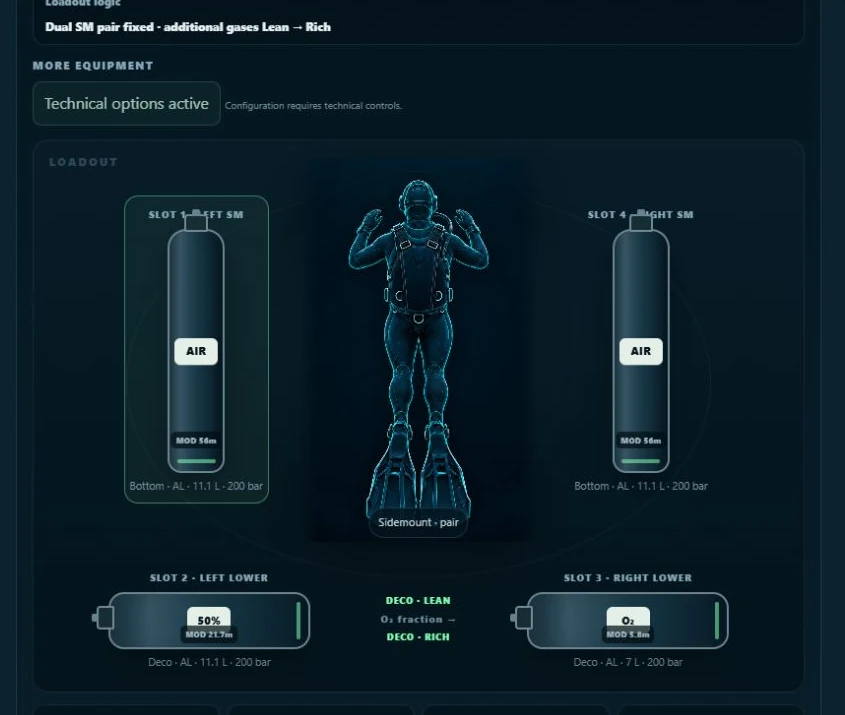
Four carry slots use lean-to-rich ordering, with a fixed primary sidemount-pair exception. Up to eight extra resources can be added to the manifest.
04 / Storage
Complete V2 profiles.
The fixed single-EAN32 demo occupies one slot. Guests have four personal slots; signed-in users have fourteen, backed by their account.
Build the diver first. Review the result as a whole.
STEP
ACTION / CHECK
01
Choose the real primary system: Single, Twinset or Sidemount. Configure every carried cylinder, its role, analysed mixture, water volume, start pressure and reserve.
02
Enter the profile and its time mode. Confirm the gas on every row after changing the loadout.
03
Open Advanced settings. Match GF, rates, RMV, oxygen limits, environment and minimum-gas assumptions to the comparison you intend to make.
04
Check residual loading. For a fresh teaching case, clear history; for a repetitive case, deliberately enable the previous result and enter the surface interval.
05
Set +depth and +time, read the acknowledgement, then select Calculate dive plan.
06
Review warnings, runtime, gas capacity, turn pressure, exposure, minimum gas and contingency. Explore the graph. A calculated schedule is not approval.
07
Name and save the profile. Copy the plan or print its A5 slate only after cross-checking the same inputs independently.
After any edit
Recalculate. Profile, equipment and settings changes can clear the displayed result. Saving also calculates first. A screenshot or copied plan is a snapshot of one calculation, not a live view of later edits.
Two time modes describe different quantities. Choose one before entering rows.
CONTROL
MEANING / USE
Depth · m
Target depth for this level. The engine-wide range is 0-150 m, but recreational configuration applies a shallower equipment/gas limit.
Time at level
The row time is stationary hold time. Travel and gas-switch time are added.
Leave-level runtime
The row time is elapsed runtime when you leave that level. It must allow enough time for preceding rows, travel and switches.
Gas
A gas resource generated from the loadout. Recheck it after changing mixtures, roles or configuration.
+ Add level
Adds a new row, initially 20 m / 10 min using an available non-bailout gas.
Remove level
Removes that row. At least one level is needed for a calculation.
Reset profile
Replaces the row list with 20 m / 30 min. It is not a reset of all equipment, settings or history.
Worked time conversion
At the default descent rate of 18 m/min, descending to 40 m takes 3 rounded minutes. A 25-minute hold therefore ends at runtime 28. Enter 28 in Leave-level runtime to describe that departure; entering 25 leaves 22 minutes at depth.
Whole-minute travel matters
Travel duration is rounded upward to a whole minute for each leg. Even a 6.0 m to 5.8 m movement can add one minute. This changes gas use, tissue loading and comparisons with a computer using continuous travel.
Use rows to describe the intended profile; inspect the resulting transitions.
STEP
ACTION / CHECK
1
Enter the first level, its hold or leave runtime, and the gas actually used.
2
Add successive levels in chronological order. In runtime mode, times must allow the travel and any switch between rows.
3
For a change to a deeper level, the new row gas is used during descent. For a move to a shallower level, travel uses the previous gas and the switch occurs at the new level.
4
Calculate and expand the detailed event schedule. Confirm the gas before, during and after each transition, not only at the final depth.
A multilevel teaching exercise
Enter 30 m / 10 min, then 18 m / 10 min on the same gas in Time at level mode. Compare the generated schedule with a single 30 m hold. This is an exercise setup, not a validated dive schedule or a guaranteed no-stop result.
Hypoxic mixtures require explicit transitions
A hypoxic bottom blend cannot simply be selected for a descent beginning at the surface. The engine checks the shallow and deep ends of travel against its 0.16 bar lower oxygen threshold and the configured working pO2 limit. Configure an appropriate carried travel gas and explicit travel level before the bottom gas; verify the return route too.
Intermediate ascent checks
This V2 source checks user-entered ascents against the GF ceiling and checks the final trajectory. Do not use manually drawn shallow levels as a substitute for validated decompression planning. The automatic ascent is generated after the last profile row.
The configuration changes the available workflow and planning restrictions.
SYSTEM
WHAT V2 MODELS
Single
One backmount bottom-gas source. Normally recreational: NDL only and no deeper than 40 m or the bottom-gas working MOD, whichever is shallower.
Twinset
A primary twinset. V2 classifies the architecture as technical-capable; it still checks gases, pressures and the profile.
Sidemount: one cylinder
Left-only or right-only primary. Entering Sidemount starts with left S80 Air, 200 bar and 66 bar reserve. Normally recreational.
Sidemount: Pair
Two independent primary cylinders. Both must support maximum planned depth within working oxygen limits to count as redundant bottom sources.
Single + suitable bailout
An active carried-slot cylinder with Independent bottom bailout role can unlock technical mode if suitable at maximum depth. Its usable gas is checked against the available minimum-gas estimate.
Technical-capable is a software classification
It reflects gas-source architecture, not diver competence, valve/regulator configuration, team readiness or verified emergency capacity for every failure. Extra deco gas alone does not turn a single bottom source into redundant bottom gas.
Progressive controls
Advanced loadout reveals helium, material, volume, roles, lower slots, manifest and engine table. Advanced controls can open automatically when the configuration or gases need them. “Technical options active” means these controls remain required.
A highlighted cylinder is only the cylinder being edited.
Historical RC2 screenshot (19 October 2026). Figure 2. Active lower cylinders, technical-mode summary and configuration audit. The air-at-40 m density warning is deliberate in the teaching case.
STEP
ACTION / CHECK
1
Click the backmount image or a side/lower slot. Read SELECTED CYLINDER and its position.
2
For an offboard cylinder, enable Carry this cylinder. Confirm IN USE rather than OFF / Not carried.
3
Set the role, mixture, model/volume, material, starting pressure and reserve. For Deco, review the switch ceiling.
4
Read the mode banner and Configuration audit, then inspect the gas list in each profile row.
The cylinder editor describes a physical resource, not just a blend name.
FIELD
HOW TO USE IT
Carry this cylinder
Includes or excludes an offboard slot. Primary-system rules preserve at least one bottom source.
Role
Primary bottom, Stage / travel, Decompression or Independent bottom bailout; availability depends on position and primary system.
Stored blend / blend buttons
Apply Air, EAN32, EAN36, EAN50, EAN80, O2, Tx18/45 or Tx21/35 to the selected cylinder. Simple recreational view hides/restricts advanced blends.
O2 % / He %
Percentages, not fractions: 18 and 45 for Tx18/45. Nitrogen is the remainder. Editing may adjust the other fraction to keep the total within 100%; recheck both.
Cylinder
Select the real model/size from the library or Custom. A model selection populates volume and material.
Water volume · L
Internal water capacity, not surface gas litres. For a twinset this is per-cylinder size.
Material
Aluminium, Steel or Other / unknown. Used for configuration/trim information, not a full buoyancy simulation.
Start · bar
Actual starting pressure used by the capacity calculation.
Reserve · bar
Simple pressure reserve withheld from normal-plan usable gas. Separate from the minimum-gas estimate.
Planned switch ceiling · m
For Deco: blank means automatic at MOD. A manual value can delay a switch to shallower water; it cannot permit a deeper-than-MOD switch.
Readouts update with the environment
The editor shows gas, applicable MOD, pO2 and density at the deepest entered level, and capacity. A deco cylinder showing a high pO2 at maximum depth is not an instruction to breathe it there: its use must remain within its switch and oxygen limits.
Backmount cylinders and editable reserves
In a twinset, enter the water volume of one cylinder. A 12 L + 12 L selection produces 24 L total; do not enter 24 L per cylinder.
Your value remains until that cylinder's starting pressure is changed again. Gas, volume or profile edits do not reapply thirds.
Switch Single / Twinset
The current backmount reserve is retained. A new starting-pressure edit reapplies the one-third default.
Retrieve an existing saved profile
Its saved reserve is retained. Edit the corresponding starting-pressure field to apply the new default.
The printed cylinder table reports each twinset cylinder separately using equal pressure drop. A 2 × 12 L system at 200 bar contains 4,800 surface litres in the ideal-gas model.
Sidemount: independent fills and reserves
Entering Sidemount creates a left primary at 200 / 66 bar. Adding the right primary through Pair or Carry this cylinder initializes that primary's reserve from its own starting pressure. Both primary cylinders, including a single-primary setup, use the editable one-third default.
Control
QA6 behaviour
Left/right starting pressure
Changing one primary sets only its own reserve to floor(start / 3). Left 232 / 77 and right 180 / 60 are independent.
Manual reserve
Retained until that same cylinder's start pressure is edited again.
Link primary mix
Links composition only. It does not link volume, starting pressure or reserve.
Same mix in both primaries
The engine pools gas capacity, then allocates consumed litres by water volume. Each bottle has equal pressure drop; its own fill and reserve remain in the physical-cylinder report.
Different mixes
Separate working gases; profile assignment and eligibility determine use.
Stage/deco
No automatic one-third reset when their starting pressure changes. These reserves remain independently editable.
Fresh standard stage/deco slots default to 50 bar. The additional-manifest cylinder initializer and some historical/demo slots retain 40 bar; inspect the displayed reserve rather than assuming all carried resources share one default.
A pooled gas surplus does not hide an individual-cylinder reserve deficit under the stated allocation. Promoting an active carried stage to a sidemount primary applies the primary default.
V2 preserves cylinder data when it changes a carried position.
ROLE
ENGINE BEHAVIOR
Primary bottom
Primary working source. Backmount is always Bottom. Sidemount bottom sources occupy the outer left/right positions.
Stage / travel
Available for explicit profile use. It is not automatically selected merely because it is carried.
Decompression
Eligible for automatic ascent switching when within its switch ceiling and oxygen limits. The engine favors a richer usable oxygen mix.
Independent bottom bailout
Reserved as a contingency resource rather than routine profile/deco consumption. A carried-slot bailout can contribute to technical-mode classification.
Lean to rich: occupied slots only
For backmount/twinset, ordering is S1 left upper → S2 left lower → S3 right lower → S4 right upper, from lower to higher oxygen fraction. Empty positions stay empty. When sorting occurs, the complete cylinder object moves, including its pressure, reserve, size and role.
Dual-sidemount exception
The independent primary left/right pair stays fixed and can have the same gas. Lean-to-rich sorting applies to the additional carried stage/deco/bailout cylinders, not across that primary pair.
Bailout scope matters
In this build, the technical-mode bailout check uses the four carried slots. An extra manifest cylinder marked Bailout is not included in that mode-unlocking check. The +depth/+time feature is not a lost-gas simulation.
Go beyond the four visual carry slots without hiding resources.
Historical RC2 screenshot (19 October 2026). Figure 4. An added X1 manifest resource with its own role, mixture, cylinder, volume, material, pressures and switch ceiling.
STEP
ACTION / CHECK
1
Expand Cylinder manifest. Review the overview of the primary system and occupied carried slots.
2
Select + Add additional cylinder. Up to eight extras are supported, identified as X1, X2 and so on.
3
Edit Role (Stage / travel, Decompression or Bailout), Blend, O2, He, Cylinder, Volume, Material, Start, Reserve and Switch ceiling.
4
Use Remove additional cylinder to remove an unwanted extra. Recheck labels, selected profile gases and results after changing the list.
Engine gas table
Expand this table to inspect the gas resources, volume and pressures generated from the loadout. Same-mix sidemount primaries can appear as one combined resource; carried and extra resources remain individually identified. Although the table cells look editable, this build regenerates gas inputs from the loadout when calculating. Make durable changes in the cylinder editor or manifest, then recheck this table.
The quick helper and the main engine use different environmental assumptions.
QUANTITY
INTERPRETATION
pO2
Oxygen fraction × ambient pressure. It rises with depth. The editor and result use the configured environment.
MOD
Maximum operating depth at the selected oxygen limit. Deco-role cylinders use the deco limit; other roles use the working limit.
Quick helper
A simple 1 ATA at the surface / 10 m per ATA Nitrox relationship. Move MOD, pO2 or EAN O2%; the related values update.
Use this EAN in selected cylinder
Applies the helper oxygen percentage to the selected cylinder as a Nitrox mix. Verify the selected cylinder before applying.
EAD
Equivalent air depth based on nitrogen pressure. It is not an oxygen, density or overall safety limit.
END
Equivalent narcotic depth. This planner treats oxygen as narcotic; helium reduces the calculated narcotic fraction.
Simple sea-level teaching formulas
pO2 = FO2 × (1 + depth / 10). MOD = 10 × (pO2 limit / FO2 - 1). EAD = (depth + 10) × (1 - FO2) / 0.79 - 10. These are helper formulas, not the exact environmental calculation used by the main planner.
Why a switch can appear at 5.8 m
At 1,013 mbar, salt-water density 1.030 kg/L and a 1.60 bar oxygen limit, the main engine permits oxygen at about 5.8 m. It rounds switch depths toward shallower water. EAN50 can show MOD 21.7 m in a rounded readout but switch at 21.6 m in the schedule.
The same GF pair does not guarantee the same runtime in two planners.
Historical RC2 screenshot (19 October 2026). Figure 5. Expanded Advanced settings: GF, RMV, travel rates and the optional no-stop safety stop.
SETTING
DEFAULT / EFFECT
GF Low / GF High
50 / 85%. Low influences deeper ascent constraints; High controls the final surface constraint. Require 0 < Low ≤ High ≤ 100.
Last stop
6 m, selectable 3-7 m. A usable richer gas may cause the engine to adjust the effective final stop shallower; review its notice.
Descent
18 m/min. Whole-minute travel rounding applies.
Ascent to first stop
9 m/min. Used for the initial ascent travel.
Between stops
3 m/min. Individual legs are rounded separately.
Last stop → surface
3 m/min. Match this with the comparison tool’s final-ascent setting.
The model is Bühlmann ZHL-16C with gradient factors and separate nitrogen/helium tissue loading. These are mathematical compartments, not measured body tissues. Changing GF is not a simple universally ranked “safer” slider.
Separate phase settings explain why two gas reports can differ.
SETTING
DEFAULT
WHAT IT CHANGES
Work / bottom RMV
18 L/min
Surface-volume rate for working/profile use.
Ascent / travel RMV
15 L/min
Ascent travel gas calculation.
Deco stops RMV
15 L/min
Stationary decompression gas calculation.
Precautionary safety stop
Enabled
Adds a safety stop to no-stop plans.
Safety depth / time
5 m / 3 min
Included in runtime and gas. Required-deco plans use their calculated stops instead.
Switch time
1 min
Adds modeled switch time and corresponding gas/tissue effects.
Working pO2
1.40 bar
Working/profile and travel oxygen checks.
Deco pO2
1.60 bar
Automatic ascent/decompression gas eligibility and MOD.
Surface litres are not bar per minute
RMV here is litres per minute referenced to the surface. It does not change with cylinder size. A consumption rate expressed as bar/min depends on water volume and must not be entered as if it were RMV.
Read the event-level gas assignment
Profile and ascent phases can use different RMV settings, and gas changes have their own timed events. The detailed schedule is the right place to reconcile a gas-use difference with another tool.
Pressure assumptions affect MOD, gas use and decompression.
CONTROL
DEFAULT / OPERATION
Water
Salt water selects 1.030 kg/L; fresh water selects 1.000 kg/L.
Density · kg/L
Can be edited for a known site. This is water density, not breathing-gas density.
Altitude · m
Default 0 m. The engine estimates surface pressure from sea-level pressure and altitude.
Sea-level pressure · mbar
Default 1013. Supply sea-level-adjusted pressure, not an already altitude-reduced station pressure.
METAR button
Requests a location and nearby aviation/weather pressure. Read the reported source and distance; verify relevance and freshness.
Using pressure retrieval
Select the METAR button only if you want location-based lookup. The implementation first attempts nearby aviation observations and has weather/location fallbacks. If retrieval fails, the existing pressure remains unchanged. The manual did not trigger location permission or test the external weather services.
Avoid double altitude correction
The sea-level pressure field and altitude are used together. Entering local station pressure and then adding altitude can apply altitude effects twice. Use an appropriate sea-level-adjusted value and confirm the actual conditions independently.
Reproducing a case
Use salt water, density 1.030 kg/L, altitude 0 m and 1013 mbar for all numerical cases in this guide. Do not fetch weather while reproducing them; it would change the inputs.
Emergency surface-volume rate for each modeled diver.
Problem time at depth
1 min
Team breathing at maximum depth before ascent.
Emergency ascent
10 m/min
Travel-time assumption for the minimum-gas estimate.
Gas handover / switch
1 min
Additional gas at the independent handover depth, when one exists.
Reference fill
200 bar
Only converts litres to cylinder-equivalent water volume in comparison reports.
No-stop endpoint
The estimate generally runs from maximum depth to the surface if there is no independent gas handover. It is separate from the normal-plan calculation, simple cylinder reserve and optional safety-stop gas.
Decompression endpoint
The estimate runs toward the first independent ascent/deco gas handover, including planned bottom-gas decompression holds before that handover. It does not prove the downstream independent gas will cover every emergency.
When no estimate is supplied
A decompression plan without an independent gas handover returns an unavailable estimate rather than an invented reserve. A schedule can still be displayed; the missing emergency estimate is a separate unresolved issue.
Saved profiles and previous tissue history are different mechanisms.
STEP
ACTION / CHECK
1
Calculate the first teaching profile and inspect its result.
2
Choose Store current result as previous dive. Confirm the previous-plan badge. This stores final inert-gas tissues in the browser session.
3
Build the next profile. Enable Start this plan from the previous calculated dive and enter the surface interval before it.
4
Calculate, review and store that result before proceeding to the next dive. The UI describes a chain of up to six calculations.
5
Use Clear history for a deliberate fresh-history exercise. Recheck the checkbox, surface interval and any retrieved profile state.
What carries forward
The model carries nitrogen/helium tissue state. During the surface interval it models surface off-gassing before the next profile. It does not reset tissues just because the next profile is shallow.
What does not carry forward
CNS and OTU in the results are for the current calculation only. V2 does not accumulate prior repetitive oxygen exposure. The displayed percentages must not be interpreted as a whole-day exposure total.
Session and saved-profile nuance
Session history is not a permanent logbook. A saved input can also contain an initial tissue snapshot, so a retrieved profile deserves explicit history review. Saving a profile is not equivalent to storing the current result as the previous dive.
Segment time is a duration; Run is cumulative elapsed time.
Historical RC2 screenshot (19 October 2026). Figure 7. Compact runtime for the 40 m / 25 min air case. The transcription in Case 4 preserves the full schedule.
Read left to right
Action identifies descent, level, ascent, switch, deco or safety stop. Depth is the segment endpoint or hold depth. Segment is time spent in that row. Run is the runtime at its end. Gas is the resource used.
Show detailed event schedule
Expand it when investigating rounding, individual holds, gas consumption or a difference between planners. The compact table groups compatible events for readability; the detailed table exposes the underlying event sequence.
These checks answer different questions; none replaces the others.
READOUT
WHAT TO LOOK FOR
CNS / OTU
Current-calculation oxygen exposure estimates. Prior repetitive exposure is not accumulated. A rounded 0% is not proof of no exposure.
Bottom pO2 / pN2 / pHe
Gas partial pressures at the deepest working point. Helium is shown when applicable.
EAD
Air depth with comparable nitrogen pressure. Useful for understanding composition, not an ascent instruction.
END
Equivalent narcotic depth under the planner’s assumption that oxygen is narcotic.
Gas density at 0 °C
Planner estimate compared against its 5.2 g/L preferred and 6.2 g/L upper references. A warning can occur even with acceptable pO2 and sufficient gas.
GF and environment
Confirm that the displayed GF, altitude and water density match the intended case.
The 40 m air case demonstrates the distinction
The result has positive gas margins and bottom pO2 around 1.06 bar, but density around 6.4 g/L triggers a danger warning. Passing one check does not cancel another.
The 50 m trimix case is not a simple depth comparison
Tx18/45 at 50 m displays about 4.8 g/L density and END about 23 m under the model’s narcotic assumption. This does not establish equivalent training requirements, equivalent decompression or equivalent overall risk to a shallow air dive.
Distinguish a rejected input from a calculated result that still needs revision.
SIGNAL
RESPONSE
Configuration audit
Review source architecture, pressure/reserve validity, mixture suitability, placement, material and density messages before calculation.
Calculation error
Read the exact text. Fix the named input or configuration. No new valid result should be inferred from an old screenshot.
CHECK THIS PLAN
A danger-level issue such as gas shortage or high density. A schedule may still be displayed; it is not ready merely because it exists.
REVIEW
An adjustment or assumption needs attention, such as a final-stop change or a preferred-density warning.
No configured-limit warnings
Only says the configured checks did not flag the result. It does not establish safety, completeness or validation.
Some audit messages block; others inform
Zero start pressure, reserve not below start, or a manual deco switch deeper than MOD can block. A steel-cylinder trim note is informational. Density can be a danger finding even when it does not prevent the engine from returning a schedule.
The contingency label is broader than it sounds
“CONTINGENCY NOT GAS-FEASIBLE” can be triggered by a danger warning as well as a negative capacity margin. In the 40 m air example, the contingency has positive litre margins but fails the density check. Read the accompanying details.
Do not wait until the reserve pressure before starting an ascent.
REPORT COLUMN
INTERPRETATION
At turn / start
Predicted pressure at departure from the final level; for other resources, pressure available when carried or first used.
Needed from turn
Scheduled gas use after leaving the final level plus that cylinder’s entered pressure reserve.
Margin
Predicted pressure minus the needed-from-turn target. Negative means the main schedule cannot preserve that reserve.
Case 1: a positive departure margin
At 18 m / 25 min, the 12 L Air cylinder predicts 91 bar at departure. The displayed required-from-turn target is 64 bar, with a +27 bar margin. That is not a universal turn rule; it belongs to this exact profile, ascent and reserve.
Case 2: no-stop but insufficient gas
At 20 m / 30 min, departure pressure is about 57 bar while about 65 bar is needed. The initial banner reports roughly 8 bar short. Independently rounded cells can show a -7 bar margin; one-bar display differences do not remove the shortfall.
Final level is not always deepest
In a multilevel profile, the turn report refers to the last entered level. Minimum gas instead uses the deepest working point. These are different locations in a plan and should not be interchanged.
Keep surface litres, cylinder water litres and pressure separate.
MEASURE
CALCULATION / MEANING
Entered available
Water volume × start pressure, in surface litres.
Simple reserve
Water volume × reserve pressure.
Margin after reserve
Available - reserve - estimated used. Every used resource must be inspected.
Profile + ascent
Consumption split around the end of the entered profile; then combined for total use.
Cylinder-equivalent volume
Surface litres ÷ reference fill pressure. It is a comparison volume, not an additional cylinder or a working-pressure rating.
Gas mass consumed
Approximate mass removed by breathing gas, using composition-dependent standard density. It is not the cylinder’s complete buoyancy change or a weighting prescription.
Example: 18 m teaching case
The 12 L cylinder at 200 bar contains 2,400 L in this model. The 50 bar reserve is 600 L. Observed use is 1,480 L, leaving about 320 L above reserve. Estimated end pressure is therefore about 77 bar.
Why the sums may differ by one litre
Each displayed cell can be rounded independently. For example, 1,309 L profile + 172 L ascent appears beside a rounded total of 1,480 L. Use the underlying calculation for reconciliation; do not treat the display as exact laboratory measurement.
Physical cylinder estimates
The result now lists each physical cylinder, including each twinset or sidemount bottle: used surface litres, start pressure, estimated end pressure, reserve and remaining margin. End pressure = start pressure - allocated litres / water volume. Same-mix pooled resources allocate litres in proportion to water volume, producing equal pressure drop. Negative end pressure indicates a gas deficit, not a physically achievable gauge reading.
The pressure-history chart and slate end-pressure table use this same accounting. Real compressibility, temperature, gauge error and cylinder-switching technique are not modelled.
Find max stay to reserve
This searches for a whole-minute hold at the last deepest level while retaining entered reserves. It is an optimizer for software constraints, not an instruction to use the maximum duration.
Set the complete loadout, profile, model settings and each cylinder's reserve.
Choose Find max stay to reserve. In recreational mode the search is additionally capped by the no-decompression limit.
Read the maximum-stay message and limiting gas. The deepest hold changes; in leave-runtime mode later leave times shift accordingly.
Review the regenerated schedule, individual-cylinder margins, oxygen/density warnings and contingency.
The search ceiling is a 600-minute hold. If even a zero hold cannot cover the modeled route and ascent, no feasible stay is reported. A returned maximum may still have warnings and does not reserve extra contingency or account for unmodelled failures.
The + plan recalculates the modified profile and ascent.
STEP
ACTION / CHECK
1
Enter Too deep · m and Too long · min. The observed defaults are +3 m and +3 min.
2
Calculate the main plan. The planner applies the additions to a deepest planned level and recalculates.
3
Inspect contingency TTS, total runtime, deco time, per-resource gas use and margins.
4
Read status and warnings. A recreational contingency entering deco is withheld as unavailable rather than offered as an executable recreational plan.
Time-mode behavior
In Time at level, the extra time adds to that level’s hold. In Leave-level runtime, the extra time shifts that and following leave runtimes. Added travel from the deeper level still affects the interpretation; do not assume identical hold increments across both modes.
Repeated deepest levels
The source modifies the first deepest level for contingency, while maximum-stay search targets the last equally deepest level. With repeated equal maximum depths, explicitly inspect which row changed.
What the + plan does not simulate
It is not automatic lost-gas, regulator failure, lost teammate, missed-stop, delayed rescue or staged-cylinder-access planning. Those scenarios need separate deliberate modeling and independent procedures.
A shared timeline, with two different units on the right axis.
Historical RC2 screenshot (19 October 2026). Figure 8. The built-in EAN32 demo graph, inspected at runtime 15 min. The left axis is depth; the right axis serves both percentages and minutes.
TRACE / MARKER
READ IT AS
Depth
Left axis, metres. Shows the entered profile and generated ascent.
GF99
Current leading compartment gradient relative to its original Bühlmann M-value, in percent. It is not the selected GF High setting.
NDL / TTS
Minutes on the numeric right axis. NDL display is capped at 99+; once decompression begins the red trace remains TTS.
Gas switches / deco stops
Timeline markers identify switches and stops; verify them against the runtime table.
Move the pointer over the graph, or focus it and use arrow keys, to inspect runtime, depth, gas, GF99 and phase. During the planned ascent, TTS is the remaining scheduled time including switches and stops. A value of 50 on the right axis means 50% for GF99 but 50 minutes for NDL/TTS.
Estimated cylinder pressure graph
A second graph shows remaining bar over runtime for every physical cylinder. Its smaller labels, thin traces, grid and rounded time divisions match the main profile. Dotted lines mark reserves. Identical traces can overlap; each cylinder retains a separate readout card with start, end and reserve values.
Use the main graph, timeline slider or play controls to move the shared cursor. Gas unused during a segment stays flat. Below-reserve values carry a textual warning; negative pressure is labelled GAS DEFICIT. The plotted curve integrates gas use against changing ambient pressure during travel. These are modeled estimates, not live gauge readings.
QA5 visual styling retained in QA6; synthetic test data deliberately includes a reserve shortfall.
Inspect the modeled compartments at a particular runtime.
Historical RC2 screenshot (19 October 2026). Figure 9. Tissue panel at runtime 35 min in the 40 m air case: compartment 3 leads GF99 at about 56%.
CONTROL
FUNCTION
Back / Forward one minute
Step through the calculated timeline.
Play / Pause
Animate the calculated plan. Playback is not a live dive-computer feed.
Runtime slider
Jump to a point in the plan.
First deco
Jumps to the first actual decompression hold. It may differ from the headline “First stop” depth.
Details & reading the bars
Opens speed (1, 5 or 10 min/sec), compartment selection and detailed pressure/rate explanations.
Follow the GF99 leader
Keeps the selected detail focused on the leading compartment; turn it off to inspect a chosen compartment.
Sixteen rows run fastest to slowest. Black bars represent dissolved nitrogen + helium pressure, cyan marks inspired inert pressure, and the white tip identifies the GF99 leader. Green/yellow/red are pressure zones, not permission to ascend. Each row uses its own changing scale; compare its values, not just bar length.
14
Measured beta outputs, including deliberate failures.
Use these settings before comparing any of the measured cases.
GROUP
COMMON INPUTS
History / time mode
Fresh tissues; no previous result. Time at level.
GF / stops
50/85; last stop 6 m; no-stop safety enabled, 5 m for 3 min.
RMV
Work 18, ascent 15, deco 15 L/min.
Travel
Descent 18, ascent to first stop 9, between stops 3, final ascent 3 m/min.
Oxygen / switch
Working 1.40 bar; deco 1.60 bar; switch 1 min.
Environment
Salt, 1.030 kg/L; altitude 0 m; sea-level pressure 1013 mbar.
Contingency
+3 m / +3 min.
Minimum gas
2 divers × 15 L/min; problem 1 min; emergency ascent 10 m/min; handover 1 min.
Reference fill
200 bar for comparison volumes.
Two additional cylinders for technical cases
Case 4, Case 5 and Case 6 use S2 EAN50 in an S80 11.1 L aluminium cylinder, 200 bar / 40 bar reserve, and S3 O2 in a 7 L aluminium cylinder, 200 bar / 40 bar reserve. Both are carried with Decompression role and automatic switch ceilings.
The primary twinset reserve is deliberately overridden
Those three cases use 2 × 12 L steel, 200 bar, 50 bar manually entered reserve. Selecting Twinset alone initially gives 66 bar at 200 bar, which will not reproduce these cases.
REFERENCE
18 m: main plan passes, contingency does not
+
Single backmount • Air • 12 L steel • 200 bar start / 50 bar reserve
ACTION
DEPTH
SEGMENT
RUN
Descend
18 m
1 min
1
Hold
18 m
25 min
26
Ascend
5 m
2 min
28
Safety stop
5 m
3 min
31
Ascend
Surface
2 min
33
OBSERVED RESULT
VALUE
Profile runtime / TTS / total
26 / 7 / 33 min
NDL at last level
21 min
Gas used / margin after reserve
1,480 L / +320 L
Departure / needed from turn
91 bar / 64 bar
Minimum-gas estimate
189 L
CNS / OTU
0% displayed / 6
+3 m / +3 min contingency
37 min total; 1,830 L used; about -30 L after reserve.
What to learn
The main result reports no configured-limit warnings, but the contingency is not gas-feasible. The additional depth and time consume more than the initial gas margin. A successful main calculation is not the end of the review.
A useful classroom question
Why is the simple 600 L reserve not the same as the 189 L minimum-gas estimate? Answer: they arise from different inputs and definitions; one is a fixed pressure reserve and the other a modeled team emergency demand.
REFERENCE
20 m: the default is not a ready plan
+
Single backmount • Air • 12 L steel • 200 / 50 bar • 30 min hold
OBSERVED RESULT
VALUE
Profile / TTS / total
32 / 7 / 39 min
NDL at last level
5 min
Gas used
1,885 L
Available above simple reserve
1,800 L
Margin after reserve
Approximately -85 L
Departure / required departure
About 57 / 65 bar
Minimum-gas estimate
212 L
Contingency
Unavailable: the configured deeper/longer case enters decompression in a recreational configuration.
Interpretation
The main plan is no-stop under the model but cannot preserve the entered reserve. This is a direct example of NDL and gas duration being independent constraints. The startup profile is a set of initial fields, not a pre-approved dive.
How to revise the exercise
Use a shorter profile, or model the actual available equipment and pressures if they differ. Recalculate and recheck all outputs. Do not lower the reserve simply to turn a red margin positive.
Rounded deficit wording
The main capacity table displays roughly -85 L while the warning may say short by about 86 L. The warning uses a conservative rounding convention. Both describe the same failed reserve check.
REFERENCE
The built-in Um El Faroud demo
+
Single EAN32 • 30 m / 20 min • 15 L steel • 200 / 50 bar
STEP
ACTION / CHECK
1
Open Your V2 dive plans and select Retrieve beside the fixed Um El Faroud - Malta demo.
2
Confirm Single, EAN32, 15 L, 200 bar and 50 bar reserve. The demo restores its own settings.
3
Acknowledge and calculate. It loads as an editable starting point; the fixed demo itself is not overwritten.
OBSERVED RESULT
VALUE
Profile / TTS / total
22 / 8 / 30 min
Safety stop / NDL
3 min at 5 m / 3 min NDL at last level
Gas used / reserve margin
1,778 L / +472 L
Bottom pO2 / EAD
1.29 bar / about 24.4 m
CNS / OTU
12% / 33
Density
About 5.2 g/L; preferred-reference warning.
Contingency
Unavailable because it enters decompression in the recreational configuration.
Why the demo still requires review
A built-in example can calculate while containing warnings and an unavailable contingency. The named site does not establish access, conditions, suitability or a route; the result is a profile calculation.
REFERENCE
40 m air: gas margin is not enough
+
Twinset Air • 40 m / 25 min • S2 EAN50 + S3 O2 • Baseline settings
OBSERVED RESULT
VALUE
Profile / TTS / total
28 / 20 / 48 min
Reported first stop / stationary deco
15 m / 8 min
Air / EAN50 / O2 use
2,623 / 237 / 231 L (individually rounded)
Total gas used
3,092 L
Margins after reserve
Air +977 L; EAN50 +1,539 L; O2 +889 L.
CNS / OTU
34% / 58
Minimum gas
475 L to the independent EAN50 handover.
Density
6.4 g/L on air at 40 m: above the upper reference.
Two critical observations
The final stop is adjusted from 6 m to 5.8 m to keep the oxygen switch within the configured pO2 limit. More importantly, the air density warning means this example is not ready despite positive gas margins.
Contingency reading
At 43 m / 28 min the result totals 58 minutes, TTS 27 and deco 14. All three capacity margins remain positive, but air density rises to about 6.8 g/L. The “NOT GAS-FEASIBLE” status here includes a danger warning, not just a shortage of litres.
REFERENCE
The complete compact schedule
+
Transcribed from the live case. All times are minutes; Run is cumulative.
ACTION
DEPTH
SEG.
RUN
GAS
Descend
40 m
3
3
Air
Level
40 m
25
28
Air
Ascend
21.6 m
3
31
Air
Switch
21.6 m
1
32
S2 EAN50
Ascend
15 m
1
33
S2 EAN50
Ascend
12 m
1
34
S2 EAN50
Ascend
9 m
1
35
S2 EAN50
Deco
9 m
1
36
S2 EAN50
Ascend
6 m
1
37
S2 EAN50
Ascend
5.8 m
1
38
S2 EAN50
Switch
5.8 m
1
39
S3 O2
Deco
5.8 m
7
46
S3 O2
Ascend
0 m
2
48
S3 O2
Why “First stop 15 m” is not the first hold
The summary reports 15 m, but the first stationary deco event is at 9 m. The chart’s First deco control jumps to runtime 35 at 9 m. Use the actual event schedule when explaining where time is spent.
The small movement with a full-minute cost
The 6.0 → 5.8 m leg consumes one rounded minute. It is followed by one minute for the oxygen switch. Removing these during comparison would change runtime and gas use.
REFERENCE
50 m trimix: read the whole result
+
Twinset Tx18/45 • 50 m / 20 min • Same EAN50 and O2 resources
OBSERVED RESULT
VALUE
Profile / TTS / total
23 / 29 / 52 min
First stop / stationary deco
21 m / 14 min
Tx18/45 / EAN50 / O2 use
2,652 / 384 / 327 L
Total gas used
3,363 L
Reserve margins
Tx +948 L; EAN50 +1,392 L; O2 +793 L.
Bottom pO2 / pHe
1.09 / 2.73 bar
EAD / END / density
18.1 m / 23 m / 4.8 g/L
CNS / OTU / minimum gas
45% / 67 / 672 L
Reproduce the setup
Select Twinset, then its backmount cylinder and Tx18/45. Confirm O2 18%, He 45%, per-cylinder 12 L, 200 bar and manually entered 50 bar reserve. Keep the two carried deco resources and baseline settings unchanged.
Contingency
The +3 m / +3 min plan totals 63 minutes with TTS 37 and 21 minutes of deco. The result says the contingency needs review. The final-stop adjustment still needs attention; positive gas margins do not constitute independent validation.
REFERENCE
Maximum stay changes the ascent too
+
Same 50 m Tx18/45 loadout as Case 5; select Find max stay to reserve.
MEASURE
20 MIN HOLD
MAX-STAY RESULT
Deepest hold
20 min
28 min
Profile runtime
23 min
31 min
TTS
29 min
40 min
Total runtime
52 min
71 min
Stationary deco
14 min
25 min
Total gas use
3,363 L
4,523 L
Limiting resource
Not an optimization
Tx18/45
Observed behavior
The optimizer updates the profile’s deepest time field to 28 minutes and reports that all used resources retain their entered reserves. The main profile, decompression and gas reports are recalculated around that new input.
What the comparison teaches
Eight additional minutes at depth add nineteen minutes to total runtime in this calculation. The additional eleven minutes outside the hold come from the changed ascent/decompression schedule. Maximum stay is not “add eight minutes and keep the old ascent.”
Preserve the original
If you want a before/after comparison, save the original Case 5 profile first, then save the optimized result as a new profile. Do not accidentally update the original when the interface indicates Update saved profile.
These are arithmetic and interface exercises, not measured decompression schedules.
Exercise A: linked mix, unequal pressure
Choose Sidemount → Pair. Keep both S80 cylinders at 11.1 L on Air. Enter 200 bar left and 180 bar right, with 50 bar reserve each. The combined engine row should represent 22.2 L at a volume-weighted 190 bar and 50 bar reserve: 4,218 L total, 1,110 L reserved and 3,108 L above reserve.
Exercise B: change one mixture
With Link left/right primary sidemount mix enabled, change a primary mixture. Observe that the other mixture changes while its starting pressure and reserve remain independent. Then disable linking and compare the separate engine resources. Recheck whether both gases support maximum depth.
Exercise C: a selected but absent cylinder
Select an empty carried slot. Its editor and default blend become visible. Before enabling Carry this cylinder, check that it still says OFF / Not carried. Enable it and inspect the manifest and profile gas list.
Exercise D: empty-slot preservation
Enable two non-primary carried slots with different oxygen fractions. Reverse their relative richness through an edit. V2 can move complete cylinder objects between occupied slots; empty slots should remain empty. Check pressure and reserve travel with the object.
Saved profiles contain the complete dive and cylinder setup.
Historical RC2 screenshot (19 October 2026). Figure 10. Guest saved-profile area with its fixed demo and Job name field.
ACTION
EXPECTED BEHAVIOR
Save current profile
Calculates first, then stores the input and summary if calculation succeeds. Use a meaningful Job name.
Retrieve
Restores the saved setup. Inspect equipment, gases, settings and history, then calculate before relying on a result.
Update saved profile
Appears for an active personal profile; replaces that profile with the current setup.
Save as new profile
Keeps the earlier saved version and creates a separate personal entry.
Delete / Undo
Personal profiles can be deleted; the interface offers an undo restoration while that deleted item is retained and a slot is available. The fixed demo is protected.
Capacity and location
Guests have 5 total slots: 1 fixed demo + 4 personal profiles in this browser. Signed-in users have 15 total: 1 demo + 14 personal account profiles. Browser-local data can be lost when site data is cleared or may be unavailable in restricted/private sessions. Calculations run locally, but account saves transmit the complete setup to the account service; the page’s local-calculation statement should not be read as a promise that cloud saves stay only on-device.
Copy and print the A5 slate
Calculate and review the current plan. Edits invalidate the prior result.
Copy plan exports settings, schedule, gas information and physical-cylinder estimates. Paste the clipboard into a temporary document to confirm success.
Choose Slate layout: A5 portrait (default) or A5 landscape, then Print A5 slate.
The separate preview checks the schedule and page fit. Select Print / save vector PDF. Use A5, the chosen orientation, 100% scale and no browser headers/footers.
Inspect the exported file. A printer's non-printable margins may differ from the preview; no physical printer is validated by this manual.
What is printed
One page inside 4 mm margins: depth/bottom time/runtime/GF/ascent-rate header; vector profile; stop table; gas specification table; and a physical-cylinder table with Start, End, Reserve and Min turn pressure. End pressure is emphasized separately for each cylinder.
BT is time held at maximum depth; RT is total runtime. The three ascent rates are first-stop / between-stops / surface. Table travel durations are explicit additions to holds or switches, so cumulative runtimes can be checked. Min turn is scheduled ascent use plus the entered reserve, not the separate emergency estimate.
Strict page-fit behaviour
Portrait accommodates longer stop lists better. Oversized tables or graph labels are blocked rather than shrunk below readable sizes, clipped or silently split. Runtime continuity, gas-list consistency and switch MOD/ppO2 are checked against the calculated plan. More than four switch labels are refused by this compact layout. A longer landscape case may fit in portrait.
The slate intentionally contains no logo, disclaimer or full warning/contingency narrative. Keep the website review and separate copied record with it. A successful print is not a validation of the plan. No automatic contingency backside is generated; this planner is open circuit, so no CCR setpoint is invented.
Current portrait layout, synthetic QA illustration. Not a real-dive instruction.16
Match inputs first; investigate differences instead of forcing agreement.
MATCH
CHECK
Model
Bühlmann ZHL-16C and the same GF Low/High; identify any proprietary or different model behavior.
Profile
Same depth sequence, hold/runtime interpretation, descent time and any multilevel gas changes.
Gas
Actual fractions, available ascent gases, switch depths, switch timing and role.
Ascent
First-ascent rate, between-stop rate, final-ascent rate, stop spacing, last stop and safety-stop behavior.
Environment
Salt/fresh density, altitude and surface-pressure assumptions.
History
Same previous tissue state and surface interval; do not compare fresh and repetitive plans.
Gas accounting
RMV phase rates, cylinder capacity, reserves, team emergency demand and endpoint.
Rounding
This planner rounds each travel leg upward to whole minutes and switches toward shallower tenths of a metre.
For a Perdix or another dive computer
The original guide included a Perdix 2 reference. This edition avoids assuming unchanged firmware menus. Consult the current manufacturer manual for that exact model and firmware, then record the comparable settings above. Sharing a GF pair does not guarantee identical schedules.
When the numbers differ
Find the first differing event: travel, switch, hold or stop. Compare that event’s gas and duration, then examine tissue/history and pressure assumptions. Do not alter real gas fractions or reserve requirements simply to make displays agree.
Read the error literally, then inspect the setting it names.
SYMPTOM
LIKELY CAUSE / NEXT STEP
Advanced controls missing
Select Advanced loadout or inspect whether the simple recreational view is active.
A rich/trimix preset is disabled
Simple recreational UI restricts advanced blends. Reveal the relevant controls and ensure the real loadout and intended dive are appropriate.
Selected cylinder not used
Selection is separate from Carry this cylinder. Check IN USE and the manifest.
Cannot set requested depth
Recreational mode limits depth to 40 m or working MOD. Gas architecture and suitability determine mode.
Recreational profile exceeds NDL
Reduce the planned exposure within the real configuration. Do not add fictitious redundancy to bypass rejection.
Invalid values / no calculation
Check all displayed ranges, even fields inside collapsed sections. Check safety acknowledgement.
Leave runtime too early
Allow preceding levels, switch time and rounded travel; correct the time mode or runtime.
Switch deeper than MOD
Reduce the manual switch ceiling or use the automatic value. Verify mixture and oxygen limit.
Gas falls below 0.16 bar
A hypoxic gas is being used at an unsuitable shallow point. Review explicit travel levels and return gas.
Last primary cannot be removed
V2 maintains at least one primary bottom-gas cylinder. Choose the intended primary configuration first.
Reserve does not change as expected
Confirm RC3 · QA6 is loaded after a hard refresh. For a sidemount primary, change its own starting-pressure field and leave the field to commit the edit. Selecting a cylinder alone does not change its reserve. Stage/deco pressure edits intentionally keep their reserve. Saved reserves are retained until a starting-pressure edit. Manual overrides last until the next starting-pressure edit of that cylinder.
Invalid gas totals, negative reserves and invalid cylinder volumes are not silently corrected by the equipment editor; fix the displayed values before calculating.
Headline stop depth and first stationary hold are different in some outputs. Read the event schedule.
Minimum gas unavailable
A decompression case has no independent handover. The engine does not fabricate that emergency endpoint.
A sidemount pair appears as one row
Same-mix capacity is pooled, but Physical cylinder estimates and the slate show each cylinder separately using equal pressure drop.
A blend/capacity change erased results
Inputs invalidated the earlier result. Calculate again.
Guest saves disappeared
Confirm browser/profile/site data and storage availability. Account and guest storage are distinct.
Save fails
A valid calculation, free slot and functioning storage/backend are required. Read the save-area message.
CNS unexpectedly low after repeat dives
Only current-calculation CNS/OTU are shown. Prior exposure is not accumulated.
METAR fails
Existing pressure is left unchanged. Enter a verified appropriate value manually.
Print preview is blocked
Read the error outside the slate. Try portrait if landscape is too crowded. The export does not reduce its minimum text size, omit stops or invent an absent schedule. Resolve input/schedule inconsistencies rather than bypassing the check.
Make the unit visible whenever you compare a number.
UNIT / RELATION
USE
m / min / m per min
Depth / time / vertical travel rate.
bar / mbar
Pressure; 1 bar = 1,000 mbar.
L water volume
Cylinder’s internal capacity.
Surface L
Gas quantity referenced to surface conditions in the planner’s simplified accounting.
L/min
RMV as surface-volume flow.
kg/L / g/L
Water density / breathing-gas density. Do not confuse them.
1 ATA
Approximately 1.01325 bar; the helper uses a simplified 1 ATA / 10 m relationship.
1 m / 1 ft
1 m ≈ 3.28084 ft; 1 ft = 0.3048 m.
1 bar / 1 psi
1 bar ≈ 14.5038 psi; 1 psi ≈ 0.06895 bar.
1 ft³
Approximately 28.3168 L. This conversion does not turn a cylinder’s nominal gas rating into its water volume.
Capacity and pressure
Available = water volume × start pressure. Reserved = water volume × reserve pressure. Estimated pressure consumed = surface litres used / water volume. For a twinset, use total water volume in these equations.
Consumption at a constant level
Gas use ≈ RMV × ambient pressure × time. At a simple illustrative 3 bar ambient, 18 L/min for 10 min uses about 540 surface litres. The planner uses its actual environment and event structure, so this is a sense-check, not a replacement calculation.
Know which labels describe a model, a resource or an exposure estimate.
TERM
EXPANSION / MEANING
ZHL-16C
Bühlmann dissolved-gas model with 16 mathematical compartments and C coefficients.
GF
Gradient Factor: a fraction of the model’s allowed supersaturation.
GF Low / High
Controls deeper and final surface gradient constraints.
GF99
Planner label for the highest current compartment gradient relative to its original M-value.
M-value
Model limit on tissue inert-gas pressure relative to ambient pressure.
CNS
Central Nervous System oxygen-exposure estimate, displayed as a percentage.
OTU
Oxygen Tolerance Unit, a modeled pulmonary oxygen-exposure measure.
SI
Surface Interval between dives.
SM
Sidemount. Left/right primary cylinders are physically independent.
S40 / S80
Common cylinder model class labels. This planner uses 5.7 L / 11.1 L water volume respectively.
S1-S4 / X1-X8
Four carried-slot labels / up to eight additional manifest resources.
BCD
Buoyancy Control Device. Material notes do not model the complete buoyancy system.
METAR / QNH
Aviation weather report / sea-level-adjusted pressure used for altimeter setting.
RC / Beta
Release Candidate / test-stage software; labels do not establish validation.
NOTOX
Gas-switch verification mnemonic referenced by the planner. Use the exact procedure taught by your training organization rather than assuming a universal expansion.
A 60-minute structure using the verified cases and interface exercises.
TIME
EXERCISE / DISCUSSION
0-10 min
Identify primary configuration, selected versus carried cylinder, actual mix and cylinder units.
10-20 min
Reproduce Case 1. Ask why the main plan passes while its contingency fails.
20-30 min
Compare Case 2. Separate NDL, simple reserve, turn pressure and minimum gas.
30-40 min
Inspect Case 4 and its runtime. Explain why positive gas margins do not remove density warnings, and why O2 switches at 5.8 m.
40-50 min
Run the sidemount linked-mix exercise. Identify per-cylinder facts versus aggregate gas rows.
50-60 min
Use chart playback, copy the result and complete an independent-comparison worksheet.
Answer key
Case 1: contingency consumes the main plan’s spare capacity. Case 2: no-stop time is a decompression constraint, not a gas guarantee. Case 4: density warning remains; switch rounding is toward shallower depth in the configured salt-water environment. Sidemount: linked composition does not imply linked pressure or equal emergency sufficiency.
Further discussion
Why does First deco jump to 9 m when Case 4 says First stop 15 m? Why can a 5.2 g/L display still produce a warning? Why should a repetitive calculation’s CNS percentage not be read as a day total?
Edition 2.1 / 21 October 2026 / RC3 · QA6. The reference is the QA6 replacement package prepared for the site owner. This document does not independently confirm which package is deployed on the public server.
Release
Relevant change
QA1
Physical-cylinder reporting, stricter editor validation, recreational max-stay, history and stale-state fixes.
QA2
Editable one-third reserve for backmount starting-pressure changes.
QA3
Single-page vector A5 slate with runtime/switch and fit checks.
QA4
Portrait/landscape selection, per-cylinder end pressures and pressure-history graph.
QA5
Pressure graph styling and mobile sizing aligned with the profile.
QA6
Independent one-third defaults and manual overrides for sidemount primaries.
Recorded local checks include 21 QA4 browser checks, eight QA5 focused checks and eleven QA6 reserve checks. These counts belong to different release suites and should not be added as distinct coverage. The sample PDFs were one-page vector exports. Authentication, account sync, location services, physical printing and real-world physiology remain outside that verification.
The retained RC2 cases and screenshots are historical observations from the 19 October 2026 manual. They are not represented as re-run against QA6. See the archived RC2 guide for the original context.